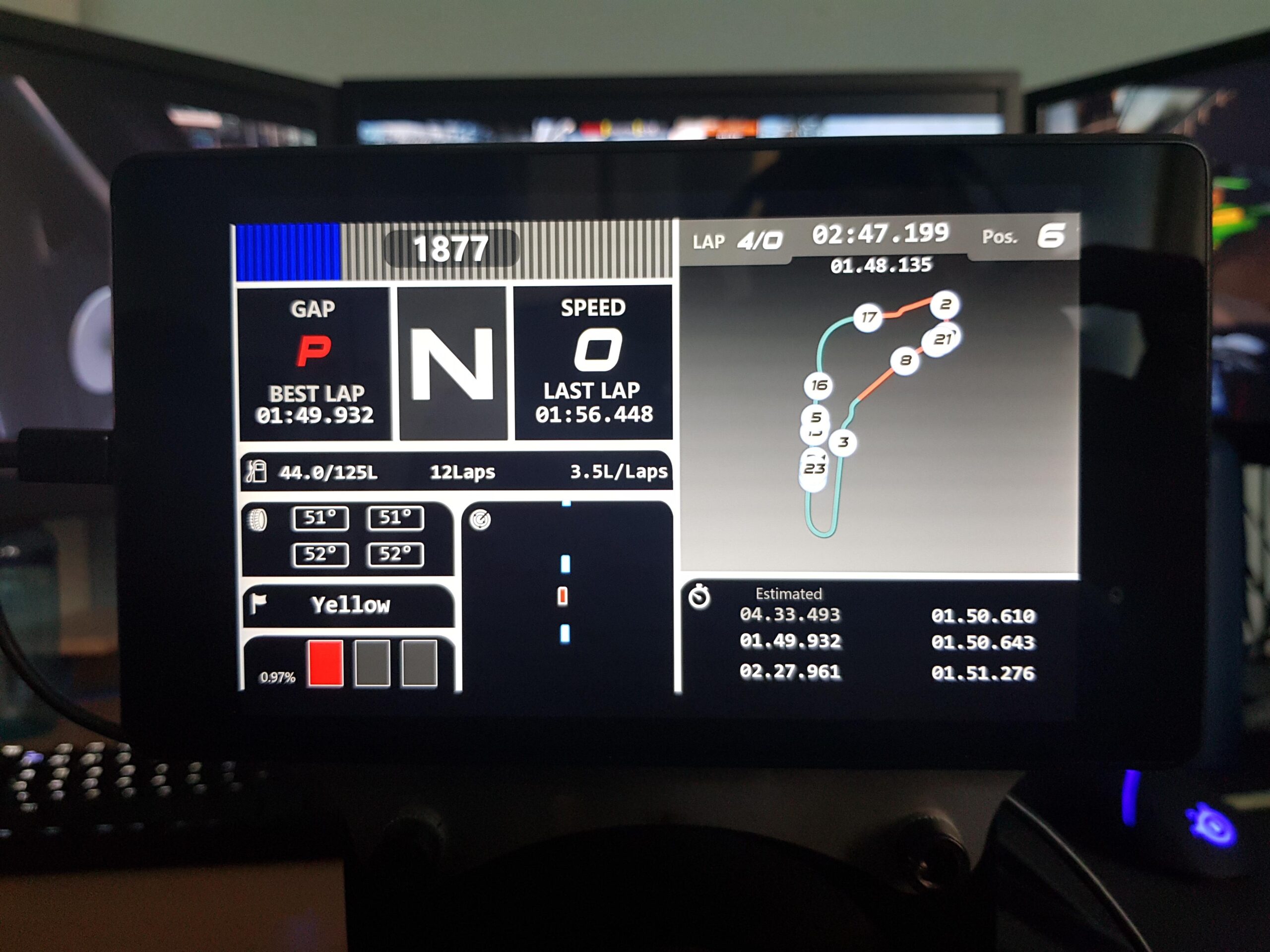
Who knew your dusty old tablet could moonlight as a full-blown racing cockpit dashboard? Today, we’ll blend spacedesk magic, SimHub’s dash powers and any old tablet—so you can track lap times and feel every bump in style.
Why You’ll Love This Setup
- No more squinting at tiny in-game gauges.
- Zero-expensive commercial dash panels.
- Total flex when friends peek over your shoulder and go “Whoa, that’s slick.”
What You’ll Need
- Windows PC (your sim-racing engine)
- Tablet (your soon-to-be dashboard)
- My proven choice: Lenovo Tab M10, with responsive touch, zero lag, and battery saver.
- Network link can be (Wi-Fi, USB tether or LAN)
- spacedesk DRIVER (PC) & VIEWER (tablet)
- SimHub (PC)
Step-By-Step Setup
- Install spacedesk
- On PC: grab the DRIVER from spacedesk.net and install.
- On tablet: install spacedesk VIEWER from your app store.
- Install SimHub
- On PC: download and install SimHub from simhubdash.com.
- Launch SimHub and explore Dash Studio—this is where you build or import community dashboards.
- Connect Your Tablet
- Plug the USB-C HDMI adapter into your tablet (or into a USB hub on your PC—your choice).
- Ensure both devices share the same network. USB tethering is your “no-lag” flex.
- Open spacedesk on both ends: select your PC in the tablet’s VIEWER. Boom—extended display.
- Wire SimHub to the Tablet
- In SimHub’s settings, choose the new spacedesk display as an active dashboard output.
- Pick or design a racing overlay: lap times, tire temps, gear indicator—your call.
- Hit “Start” in SimHub; the data streams in real-time to your tablet.
- Customize & Drive
- Rotate tablet for portrait or landscape.
- Tweak SimHub’s gauge colors or add warning LEDs.
- Use touch (via spacedesk) to switch pages or reset lap times.
Pro Tips for Zero Regret
• 720p for the Win: If FPS dips, drop to 720p in spacedesk preferences—smooth visuals > pixel paradise.
• Disable Sleep: On your tablet, turn off screen sleep or risk a dark dash mid-race.
• Cable Taming: Velcro ties and adhesive clips keep the adapter cable from sabotaging your pedals.
• Dash Studios Galore: Browse the SimHub community for ready-made dashboards—no design skills required.
Conclusion
There you have it: a pocket-sized racing/flight dash that’s kinder to your wallet than branded control panels. With spacedesk, SimHub and a humble HDMI adapter, you’ll feel every apex and power slide—plus, bragging rights are included free of charge.
Ready to build your killer cockpit? Grab your Lenovo Tab M10, fire up spacedesk & SimHub, and let’s hit the track—bring snacks!

Leave a Reply